---
title: "Free and Pro"
description: "What the Free plan of Chat to Markdown includes, how the 10-chat limit is counted across all services, what happens when it is reached, and what Pro adds."
url: https://chattomarkdown.com/docs/1.0.3/free-and-pro/
version: "1.0.3"
updated: 2026-11-07
---
# Free and Pro
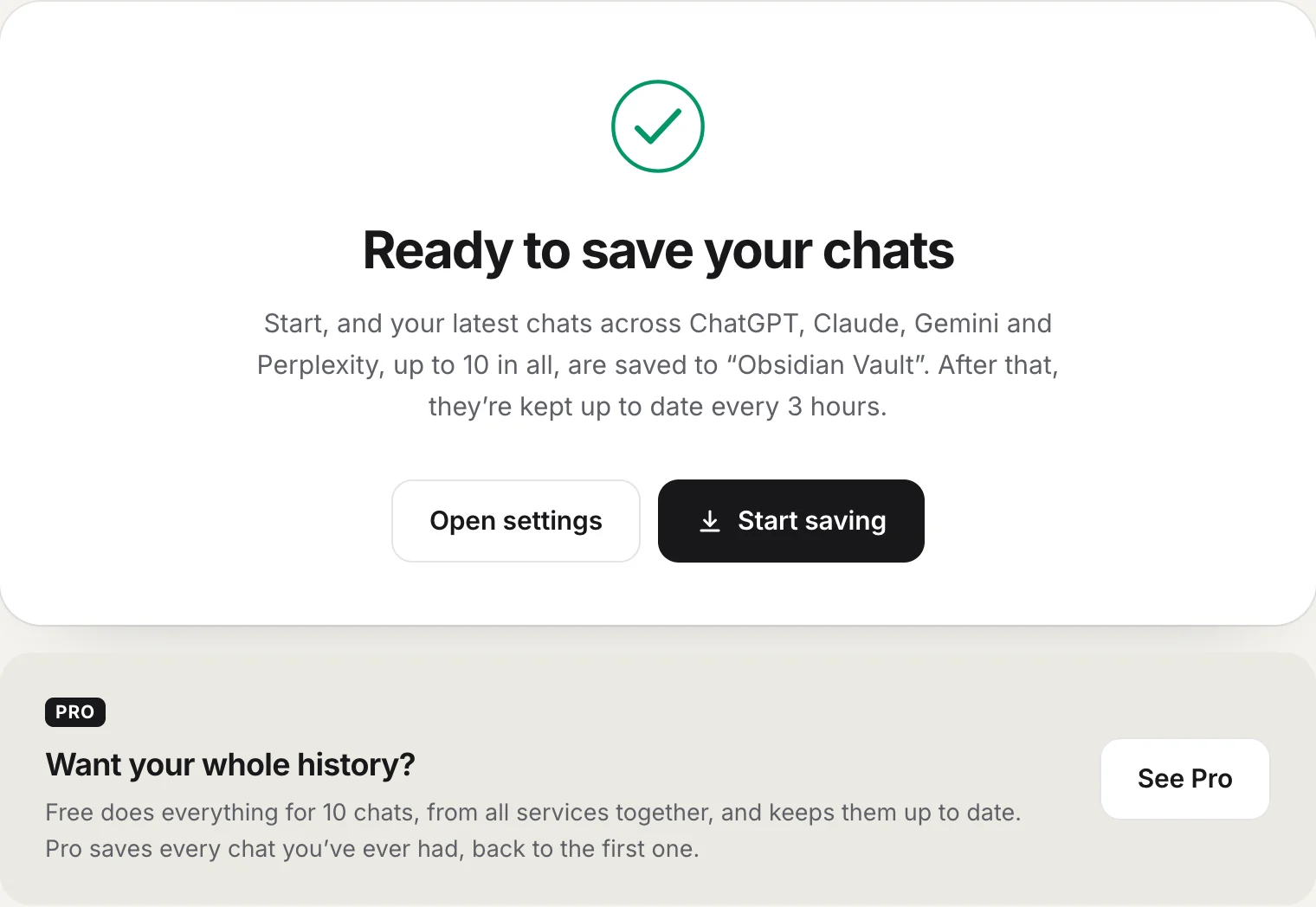
> Free has every feature for 10 chats, counted across all services together, and keeps those 10 up to date for good. A chat counts the first time it is saved. Once all 10 are used, new chats aren't saved; Pro saves every chat you have ever had.
Chat to Markdown has two plans. Free has every feature and keeps 10 chats saved and up to date. Pro does the same for every chat you have ever had. This page explains exactly how the 10 chats are counted and what changes when you reach them.
## What Free includes
Every feature works on Free. Nothing is held back except how many chats are saved. On Free you get:
- **10 chats, from all services together**, saved and kept up to date for good.
- **All 8 services**: ChatGPT, Claude, Gemini, Microsoft Copilot, Perplexity, Grok, DeepSeek and GitHub Copilot.
- **Automatic saving** on your schedule, and saving when you leave a chat.
- **The Save button** and its menu (copy as Markdown, copy for another AI, save as PDF, Word, HTML, text, JSON or CSV), for any chat until your 10 are used.
- **Pictures and files**, version history, chats deleted on the site kept on disk, your own file names, earlier versions of messages, hiding secrets.
- **The reader and search** for every chat you saved.
- **Obsidian extras**: daily note links and a table of contents.
- **Notion, Google Drive and GitHub**, for the chats you saved.
- **Import a data export**, to fill your 10 chats.
You don't need an account for Free. Free is not a trial and doesn't expire.
## Is there a free trial?
There is no time-limited trial, and nothing to cancel. **Free is how you try it**: it has every feature, for 10 chats, for as long as you want, with no account and no card. Most people use it like this:
1. **Set it up on Free.** Choose your folder and turn on your services. Your 10 latest chats are saved and kept up to date. See [Set up in two minutes](https://chattomarkdown.com/docs/1.0.3/setup/).
2. **Try everything on those 10 chats.** Open them in Obsidian or [the reader](https://chattomarkdown.com/docs/1.0.3/reader/), use the Save button, export a PDF, send them to [Notion](https://chattomarkdown.com/docs/1.0.3/notion/), look at a chat's [version history](https://chattomarkdown.com/docs/1.0.3/version-history/).
3. **Get Pro when you want every chat.** Pro saves your whole history on every service, back to the first chat, and every chat in a data export. Your 10 free chats stay as they are. See [Upgrade, sign in and manage your plan](https://chattomarkdown.com/docs/1.0.3/upgrade/).
If you buy Pro and change your mind, you can ask for a refund within 14 days of paying, as long as Pro hasn't been used yet: no more than 10 chats saved and no whole export imported. The [Terms](https://chattomarkdown.com/terms/#refunds) have the details.
> [!NOTE]
> The screenshots in these docs show Pro, the plan with every chat. On Free everything looks the same, except where a page says otherwise: the 10-chat count in the popup and the Save menu, and the Pro offers.
## How the 10 chats are counted
Think of Free as 10 places. A chat takes a place the **first time it is saved on Free**, and keeps it. From then on it is kept up to date as often as it changes, without using another place.
A chat takes a place when any of these saves it for the first time:
| How it is saved | When it counts |
|---|---|
| A sync (automatic or **Sync now**) | The first syncs fill your free places with your latest chats, newest first, from every service that is on. |
| The **Save button** or Alt+Shift+S | When you save a chat that isn't one of your 10 yet. |
| Leaving a chat | When the chat is saved a few seconds after you leave it. |
| **Copy as Markdown**, **Copy for another AI**, **Save as** (any format) | On a chat that isn't one of your 10 yet: it is saved first, so it takes a place. |
| **Re-sync** in the reader | On a chat that isn't one of your 10 yet. |
| An import | Each chat the import writes. |
What does **not** use a place:
- Updating a chat that is already one of your 10, however often it changes.
- A chat that a skip rule leaves out of a sync (see [How your files are organised](https://chattomarkdown.com/docs/1.0.3/folder-structure/)).
- Copying, exporting or saving again a chat that is already one of your 10.
The places are counted across all services together, not 10 for each. Once a chat has a place it keeps it: deleting its file, turning its service off, or setting the service to **Only chats I save** doesn't give the place back. The same is true of [Start over](https://chattomarkdown.com/docs/1.0.3/start-over/): it deletes the files, but your free places stay with the same chats.
> [!TIP]
> If you want to choose your 10 chats yourself instead of getting your latest ones, set each service to **Only chats I save** before you press **Start saving** (in **Settings → Chat services**, or the **⋯** on a service's card in the popup). Then only chats you save with the Save button take a place. See [Chat services](https://chattomarkdown.com/docs/1.0.3/services/).
## Where to see how many are used
- **The popup**, at the bottom: for example **3 of 10** free chats used · 7 left, with ten small bars.
- **Settings**, in the sidebar: "3 of 10 free chats used. 7 left, each kept up to date."
- **The Save button's menu** on a chat page: a **Free chats** card with the count, and a note on this chat: "This chat is one of them, kept up to date." or "Saving, copying or exporting this chat uses one. It stays up to date after that."
- **Before you save** a chat that isn't one of your 10, the Save button's tooltip says "Uses 1 of your 7 free chats left", and the popup says "Not saved · uses 1 of 7 free chats left".
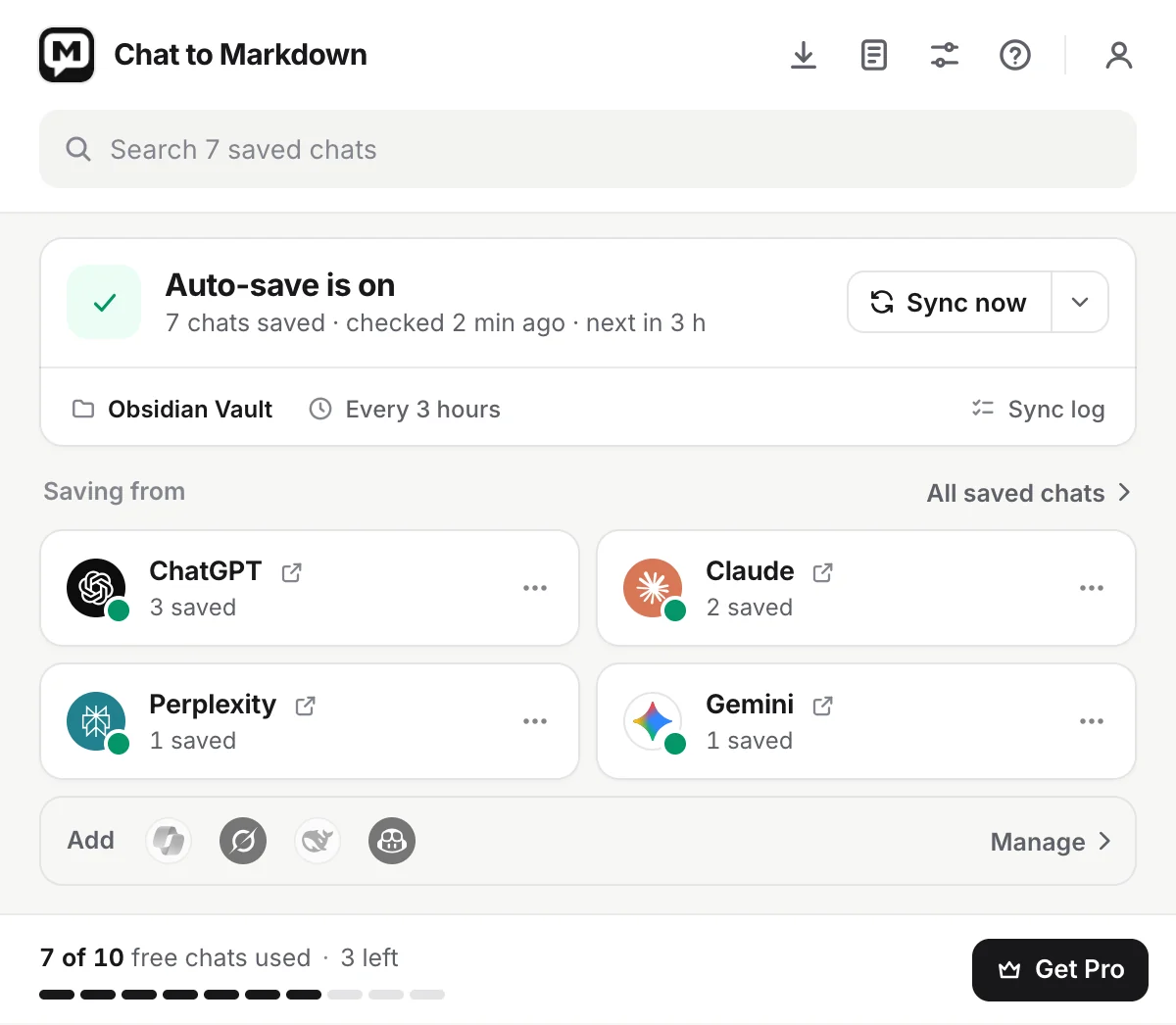
1. **Account**: Free, and **Get Pro**.
2. **Status**: whether saving works. The count of free chats is at the bottom of the popup.
## What happens when all 10 are used
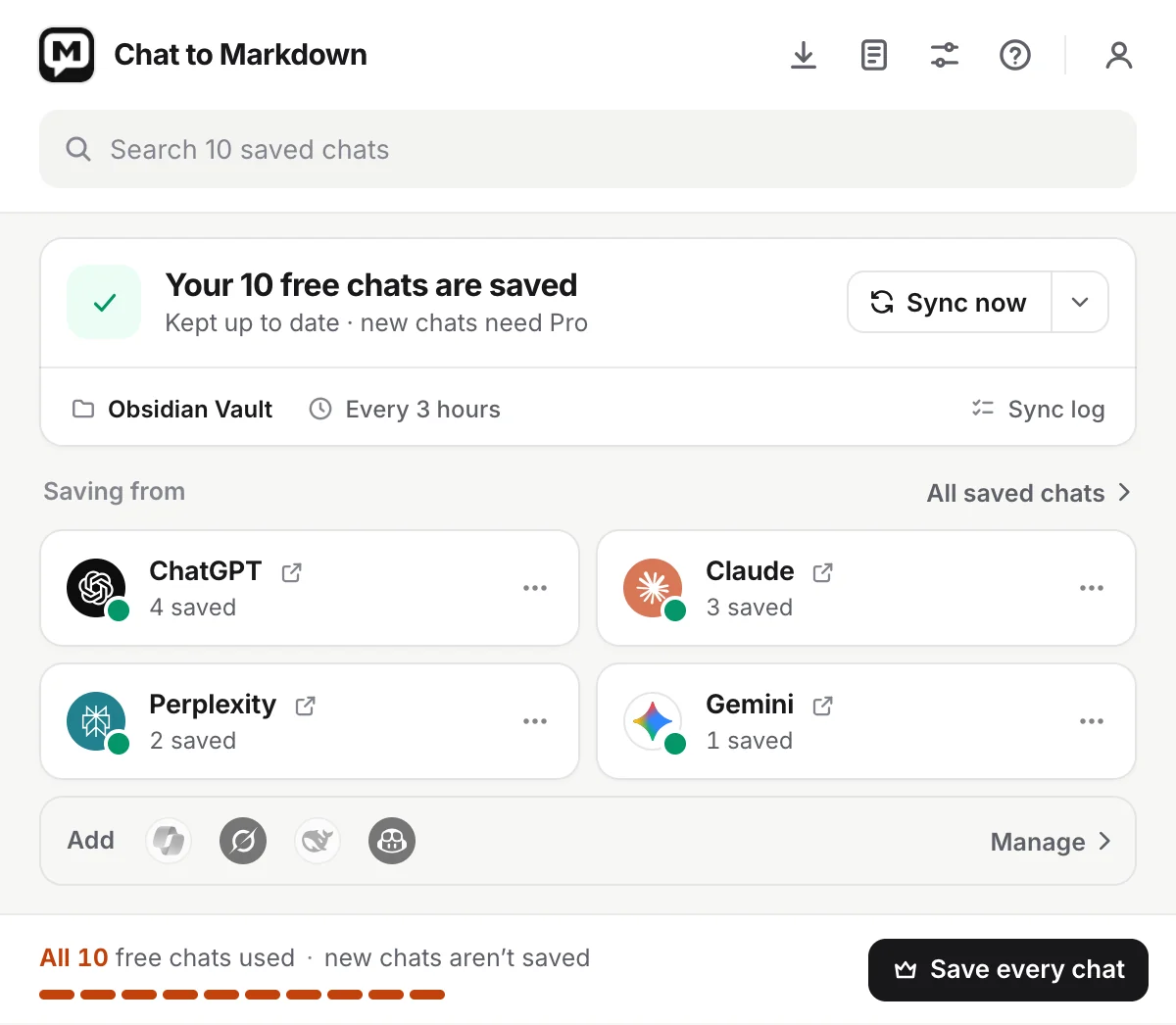
Your 10 chats keep being saved and updated exactly as before. What changes:
- **New chats are not saved.** Syncs skip every chat that isn't one of your 10. The popup's status reads **Your 10 free chats are saved**, "Kept up to date · new chats need Pro", and the bottom line reads **All 10** free chats used, with how many more aren't saved once a sync has counted them.
- **The Save button shows a lock** on chats that aren't one of your 10. Its menu says **No free chats left**: "Your 10 stay up to date. Pro saves every chat." Clicking Save shows "All 10 free chats are used. Pro saves every chat." with **Get Pro**.
- **Copy** and **Save as** on those chats are tagged **PRO** and open the plans. They keep working on your 10.
- **In the popup**, a chat open in the tab that isn't one of your 10 reads "Not saved · all 10 free chats are used", with **Get Pro**.
- **An import** saves nothing new; the import page tells you before it starts.
Files you already have are never deleted. A chat saved earlier that isn't one of your 10 (for example from a time you had Pro) stays as it is on disk but isn't updated; the popup says "Saved once · all 10 free chats used, so it isn’t updated".
## What Pro adds
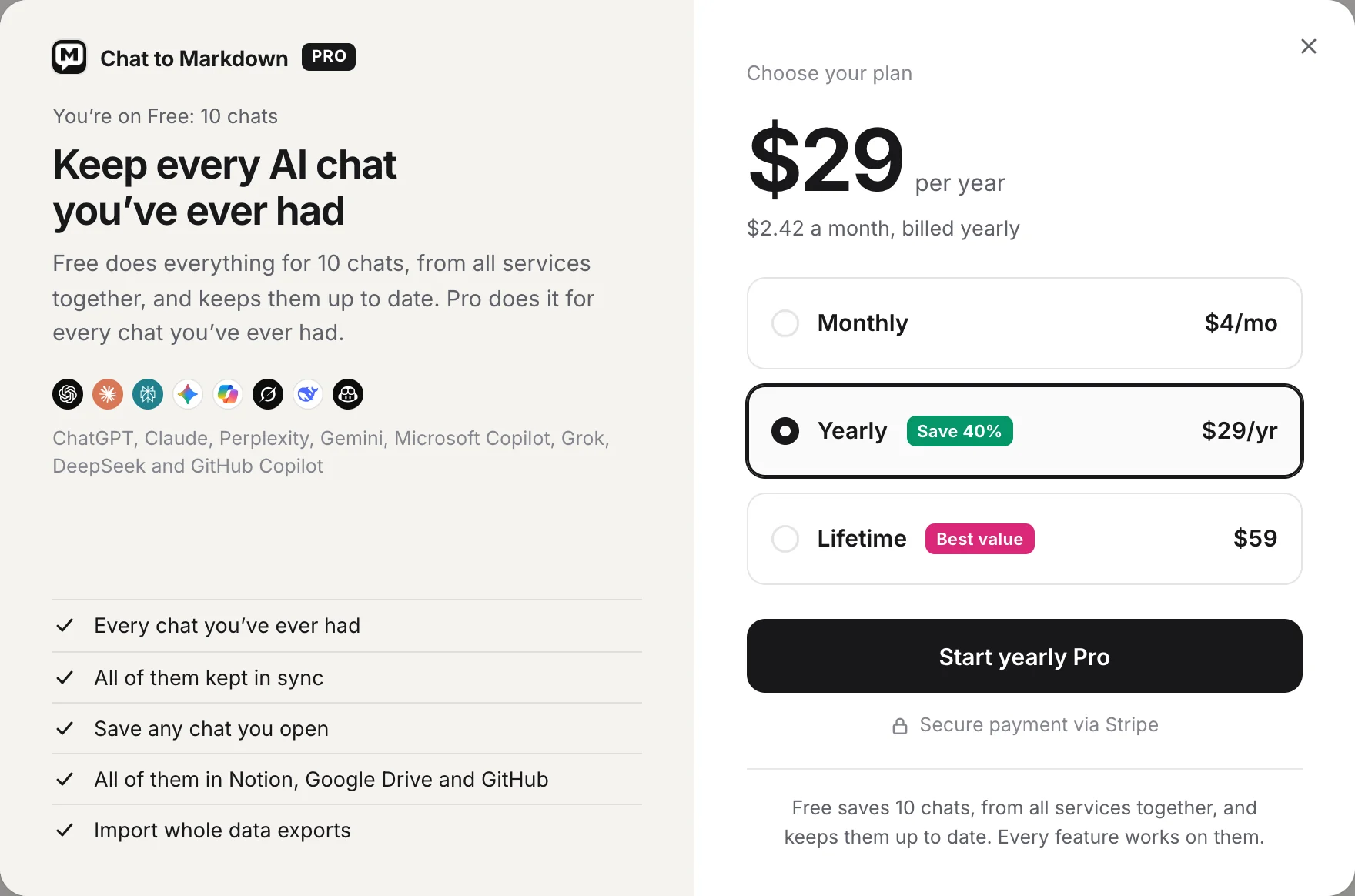
Pro is about how many chats, not which features. It adds:
- **Every chat you've ever had**: your whole history on every service, back to your first chat, saved in the background.
- **All of them kept in sync**: new and changed chats are saved on your schedule, never as a second copy.
- **Save any chat you open**: any chat, however old, with one click: saved, copied, or as PDF, Word and more.
- **All of them in Notion, Google Drive and GitHub**: every chat goes there, not just your 10.
- **Import whole data exports**: every chat in an export is saved at once, from ChatGPT's ZIP to Gemini's Takeout.
When Pro turns on, the extension starts saving the chats Free left out right away, newest first. A long history takes a while, because it only goes as fast as each site allows. See [How saving works](https://chattomarkdown.com/docs/1.0.3/how-saving-works/).
Pro comes as Monthly, Yearly or Lifetime. All three are the same Pro; see [/pricing/](https://chattomarkdown.com/pricing/) for prices. To buy it, see [Upgrade, sign in and manage your plan](https://chattomarkdown.com/docs/1.0.3/upgrade/).
## If Pro ends
If you cancel Monthly or Yearly, Pro stays on until the end of the month or year you paid for. Then the extension goes back to Free:
- **Your files stay.** Every chat saved on Pro stays in your folder as plain Markdown.
- Free keeps up to 10 chats up to date: the ones that were your free chats before Pro, or, if you had none, your latest chats.
- Other chats are no longer updated and new ones aren't saved, as described above.
Buy Pro again at any time and everything is kept in sync again.
## Common questions
**Do Notion, Google Drive and GitHub cost extra?** No. They work on both plans and get the chats you have saved: on Free your 10, on Pro all of them.
**Does Pro work on more than one computer?** Yes. Pro belongs to your account. Sign in on the other computer. See [Upgrade, sign in and manage your plan](https://chattomarkdown.com/docs/1.0.3/upgrade/#use-pro-on-another-computer).
**What does "using Pro" mean for a refund?** Saving more chats than the 10 Free keeps, or importing a whole export. The extension tells our server the first time that happens. The refund rules are in the [terms](https://chattomarkdown.com/terms/#refunds).
## Questions
### Is the limit 10 chats per service?
No. It is 10 chats in all, from every service together. Ten ChatGPT chats use all of them.
### Does a chat count again when it updates?
No. A chat counts once, the first time it is saved. After that it is kept up to date as often as it changes, at no extra cost.
### If I delete a saved file, do I get the chat back?
No. Once a chat is one of your 10, it stays one, even if you delete its file or turn its service off.
### Is there a free trial?
There is no time-limited trial. Free is the way to try it, for as long as you like, without an account or a card. It has every feature, for 10 chats.
### Is Free a trial?
No. Free doesn't expire. Your 10 chats are kept up to date for as long as you use the extension.
### Can I get my money back if Pro isn't for me?
You can ask for a refund within 14 days of paying, as long as Pro hasn't been used yet (no more than 10 chats saved and no whole export imported). The Terms have the details.
### How much is Pro?
See the pricing page at chattomarkdown.com/pricing/. Pro is one plan with three ways to pay; all three include the same features.